Mermaid API skill
Ask your coding agent to check or draw a Mermaid diagram, and it does it for you through Mermaid API. With the mermaid-api skill installed, your agent can:
- Validate diagram code. When the code is invalid, the API reports the line and column where the parser stopped, and the agent fixes the code there and checks again.
- Render a diagram to an SVG, PNG or PDF file at the path you name.
- Show a diagram as ASCII text right in your terminal. See below.
- Repair invalid code with Mermaid AI. Send it a diagram that won’t parse and it returns a fixed version.
- Generate a diagram from a description with Mermaid AI.
Beta. Mermaid API and the skill are in beta. Fields, limits and the latest supported Mermaid version can change. Don’t build a production dependency on them.
Diagrams right in your terminal
Ask for a diagram as text and the agent prints it as ASCII art in the chat. You see the diagram where you’re working, with no file to open and no image viewer.
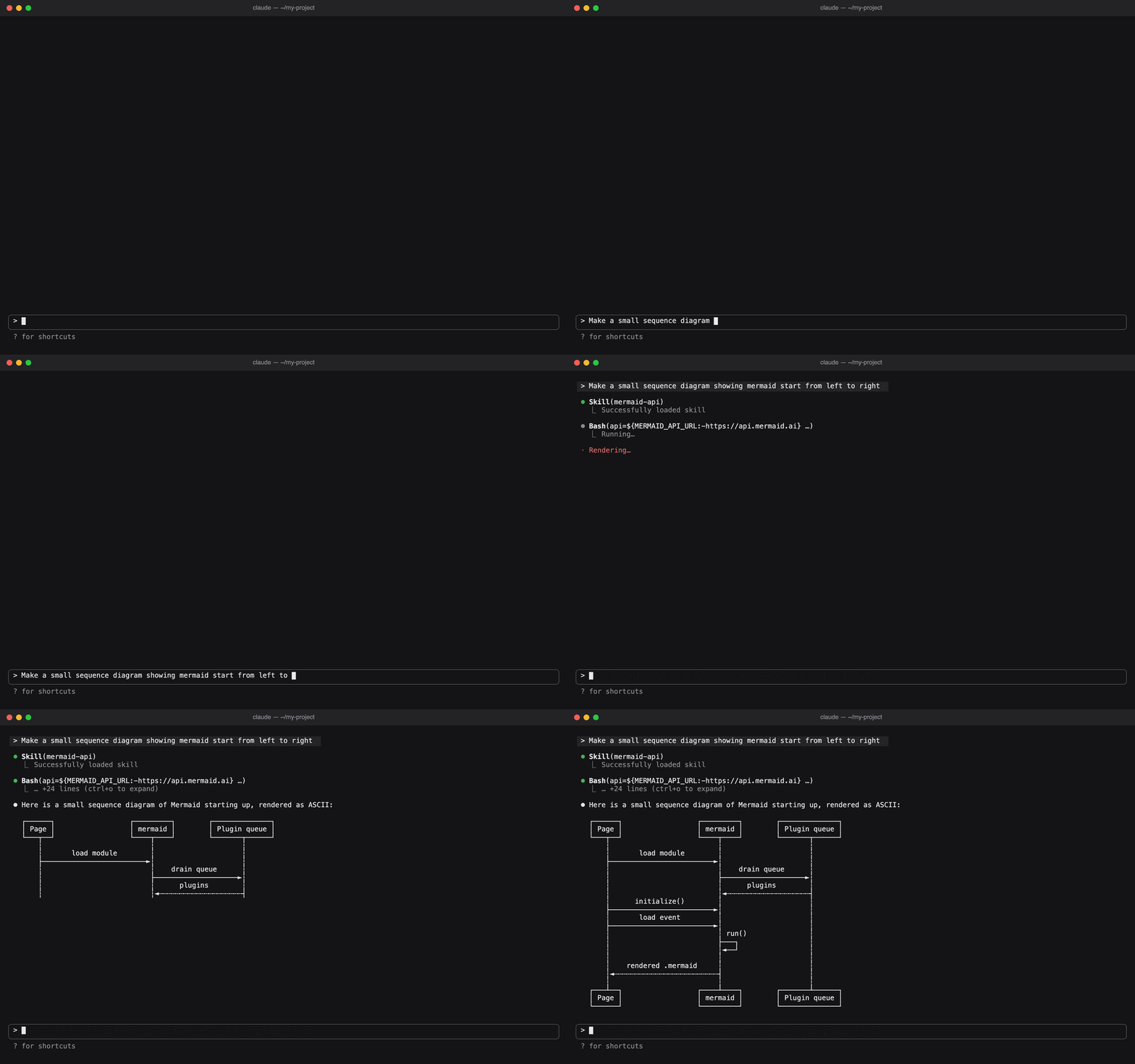
Try a prompt like:
Show me a sequence diagram of how a user logs in, as ASCII.
ASCII rendering uses the experimental Mermaid 13 alpha. Sequence diagrams and flowcharts work; not every diagram type can be drawn as text yet, and the output can change as new alphas ship. When you need a file for docs or slides, ask for SVG, PNG or PDF instead.
Before you start
You need:
- A coding agent that can run shell commands and supports Agent Skills: Claude Code, Codex, Cursor and others.
- macOS, Linux or WSL. Native Windows PowerShell is not supported.
curl, and ideallyjq.jqships with macOS 15 and later and most Linux distributions; without it the agent still works, using temporary files.- A Mermaid API key. Each call costs API credits; see What it costs.
Install the skill
In Claude Code, use the plugin marketplace:
/plugin marketplace add Mermaid-Chart/skills
/plugin install mermaid-api@mermaid
In any other agent, use the skills CLI:
npx skills add Mermaid-Chart/skillsInstall by hand instead
Copy the skills/mermaid-api folder from the Mermaid-Chart/skills repository into your agent’s skills folder:
| Agent | All projects | One project |
|---|---|---|
| Claude Code | ~/.claude/skills/ | .claude/skills/ |
Codex, Cursor and agents reading .agents/ | ~/.agents/skills/ | .agents/skills/ |
Set up your API key
The first time you ask for a diagram without a key, the agent walks you through this. You can also do it up front.
-
Open the Mermaid API console and create a key. It is shown once, so copy it.
-
In your own terminal, not through the agent, run this and paste the key when asked. Nothing is shown as you paste.
mkdir -p ~/.config/mermaid-api && (umask 077; printf 'Mermaid API key: '; read -rs k && printf 'Authorization: Bearer %s\n' "$k" > ~/.config/mermaid-api/credentials; echo) -
Tell the agent you’re done. It checks the key, for free, and tells you how many credits you have.
The key is saved in ~/.config/mermaid-api/credentials. See Reference if you’d rather create that file yourself or use an environment variable.
Try it: fix and render a diagram
This takes a few minutes and 7 credits. The responses shown are real; what your agent says around them will vary.
Save this as checkout.mmd in your project. It has a mistake: the Sign in node on line 4 is missing its closing bracket.
flowchart LR
  A[Cart] --> B{Signed in?}
  B -- yes --> C[Payment]
  B -- no --> D[Sign in
  D --> C
  C --> E[Order confirmed]
1. Fix it
Ask the agent:
Validate checkout.mmd with Mermaid API and fix any errors.
The agent sends the file to Mermaid API, which reports where the parser stopped:
"details": { "line": 4, "column": 17 }The agent closes the bracket on line 4, validates again, and tells you the diagram is now valid:
-  B -- no --> D[Sign in
+  B -- no --> D[Sign in]
2. Render it
Ask the agent:
Render checkout.mmd to docs/checkout.png.
The agent writes docs/checkout.png:

That’s the only file it creates. For SVG, PDF, or text in the terminal, ask for that format instead.
What the agent runs
Every command starts with two lines that pick the API URL and pass your key to curl without showing it:
api=${MERMAID_API_URL:-https://api.mermaid.ai}
if [ -n "$MERMAID_API_KEY" ]; then auth=(-H "Authorization: Bearer $MERMAID_API_KEY"); else auth=(-H @"$HOME/.config/mermaid-api/credentials"); fi
Validate reads the file in place:
jq -Rs '{code: .}' checkout.mmd | curl -sS "$api/v1/validate" "${auth[@]}" -H 'Content-Type: application/json' --data @-Render writes to a temporary file and moves it into place only on success:
tmp=$(mktemp)
status=$(jq -Rs '{code: ., format: "png"}' checkout.mmd | curl -sS -o "$tmp" -w '%{http_code}' "$api/v1/render" "${auth[@]}" -H 'Content-Type: application/json' --data @-)
if [ "$status" = 200 ]; then mv "$tmp" docs/checkout.png && chmod 644 docs/checkout.png; else cat "$tmp"; rm -f "$tmp"; fi
What it costs
Each call is charged in API credits to the key owner’s balance. The walkthrough above used 7: two validates and one render.
| You ask the agent to… | Endpoint | Credits |
|---|---|---|
| Validate a diagram | POST /v1/validate | 1 |
| Render a diagram | POST /v1/render | 5 |
| Generate a diagram | POST /v1/generate | 25 |
| Repair a diagram | POST /v1/repair | 25 |
| Check your key or balance | GET /v1/balance | Free |
Two exceptions: repairing code that is already valid costs 1, and an ASCII render of a diagram type that can’t be drawn as text is refused and costs nothing. To see your balance and when it resets, ask the agent.
Your key and your files
- Your key stays out of the chat. The agent passes the credentials file or
MERMAID_API_KEYstraight tocurl, and the skill tells it never to print or read them. Don’t paste the key into the chat yourself. - The key lives outside your projects, so it can’t be committed by accident.
- The agent creates only the files you ask for, and removes its scratch files.
- A failed render never overwrites an existing file.
Troubleshooting
The agent says no key is set up, but you saved one. Check the file name. The skill reads ~/.config/mermaid-api/credentials and nothing else in that folder; a file named .env is ignored. Run the setup command again, or rename your file. If MERMAID_API_KEY is set, it is used instead of the file.
401 ERR_KEY_UNKNOWN. The key wasn’t copied whole. Run the setup command again with the whole key, or create a new one in the console.
401 ERR_KEY_REVOKED or ERR_KEY_EXPIRED. The key no longer works. Create a new one in the console. An organisation admin can restore a revoked organisation key.
402 ERR_LIMIT_BALANCE. Your credits are spent. The agent stops and tells you. Ask it for your balance to see when your monthly allowance resets.
429 ERR_LIMIT_BURST. Too many calls in one minute. The agent waits as long as the API asks, then retries once.
Anything else. The agent looks the error up and explains it. When you report a problem to Mermaid, include the x-request-id the agent gives you.
Reference
Credentials file
~/.config/mermaid-api/credentials holds one line, readable only by you (mode 600):
Authorization: Bearer mmd_<12 hex characters>.<secret>Environment variables
| Variable | Effect |
|---|---|
MERMAID_API_KEY | The bare key, without Authorization: Bearer. Takes precedence over the credentials file. |
MERMAID_API_URL | Points the skill at another Mermaid API deployment. Defaults to https://api.mermaid.ai. |