Mermaid API · Open beta
Let your agent draw. We make sure the diagram works.
Mermaid diagrams for your code, agents and products. One API call.
Send diagram code or a plain-language description. Get back a verdict, a rendered image, or a working diagram. No headless browser to host, no Mermaid version to track.
Four calls, one key
Validate
Check diagram code before anyone sees it. If it is broken, you get the line, the column and a stable error code your program can act on.
Render
Turn diagram code into SVG, PNG or PDF, with any Mermaid theme, look and layout, including Mermaid's own premium layouts.
Generate
Describe a diagram in plain language and get valid Mermaid code back. Every result is checked before it reaches you.
Repair
Send broken diagram code and get working code back, checked the same way.
This is the starting point. More is on the way; see "What's next".
Where Mermaid API fits
AI agents and chat tools
Language models write Mermaid well, but not perfectly. Validate what your model produced before your user sees it, repair it when it breaks, and render it to an image your chat or app can show.
Docs and CI pipelines
Render the diagrams in your docs to SVG, PNG or PDF at build time. Validate them in CI and fail the build on a broken diagram, before it ships.
Your own product
Offer diagrams to your users without running a browser farm. Send the code, get the image, keep shipping features.
Diagrams from a description
Turn a sentence into a first draft. "Alice says hello to Bob, as a sequence diagram" becomes working Mermaid code, ready to render or refine.
One request. A real answer.
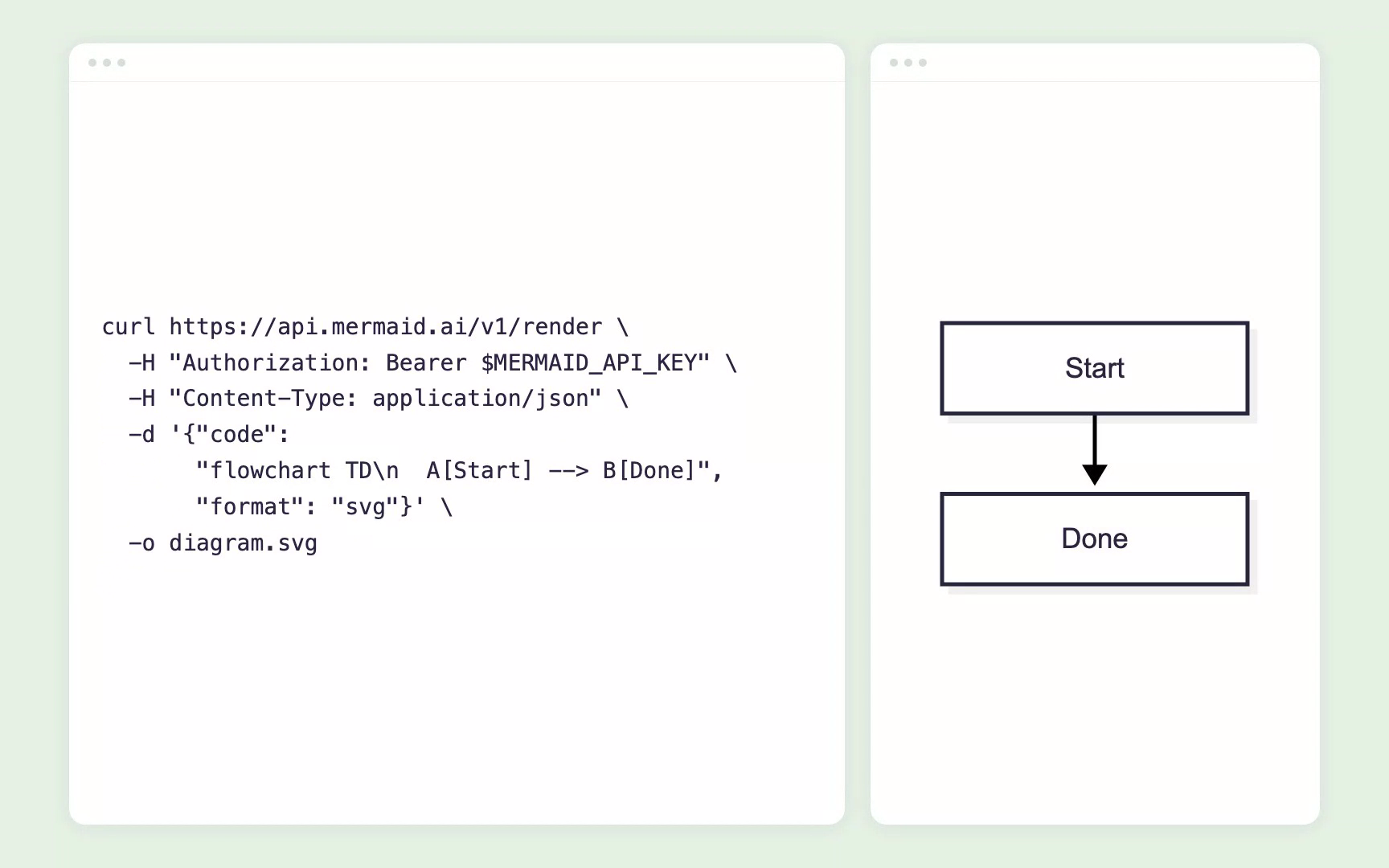
curl https://api.mermaid.ai/v1/render \
  -H "Authorization: Bearer $MERMAID_API_KEY" \
  -H "Content-Type: application/json" \
  -d '{"code": "flowchart TD\n  A[Start] --> B[Done]", "format": "svg"}' \
  -o diagram.svg
The response is the image itself, ready to write to disk.
curl https://api.mermaid.ai/v1/validate \
  -H "Authorization: Bearer $MERMAID_API_KEY" \
  -H "Content-Type: application/json" \
-d '{"code": "flowchart TD\n A --> B\n C ==>> D"}'{
"valid": false,
"diagramType": "flowchart-v2",
"error": {
"code": "ERR_DIAGRAM_INVALID",
"message": "Parse error on line 3: ...",
"details": { "line": 3, "column": 4 }
}
}Not just "invalid": the exact line and column, so your agent can fix it.
Mermaid is open source. Why use the API?
Nothing to host
Rendering Mermaid needs a headless browser. We run it, so you send one HTTP request.
Always the latest Mermaid
Including Mermaid's own layouts and themes, the day they ship.
Answers a program can use
Stable error codes with line and column, not a stack trace.
Built by the Mermaid team
The people who make Mermaid run the service.
Built for programs, not people
Self-describing
An OpenAPI document and an llms.txt, so agents and code generators can find their own way around.
Stable error codes
Every failure has a documented code that will not change. Messages may improve; codes stay.
Pin your Mermaid version
Choose the Mermaid version a call uses, so a render does not change under you.
Know your balance
A free endpoint tells your program what it has left and what each call costs. Out of credits says "buy"; too fast says "wait".
From sign-in to first diagram in a minute
01.
Use your Mermaid account at the console. Free accounts work.
02.
Name it after where it runs, like "CI" or "support bot".
03.
Diagram code, or a description of the diagram you want.
04.
A verdict, an image, or working diagram code.
Free to start. Pay as you grow.
Every Mermaid account, free ones included, comes with a monthly allowance of API credits. Each call costs a set number of credits, published in the docs. When your allowance runs out, buy more credits in the console. Your key never changes: it spends the allowance first, then the credits you bought.
This is just the start
Validate, render, generate and repair are the foundation. Coming soon:
Storage
Keep your diagrams with us and call them up by ID.
Sharing
Share a diagram with a link.
Valid, rendered, and ready to ship.
Give your code, your agents and your product diagrams that work.