Made for teams like yours — trusted by over 5M people and over 200k companies
From the team behind Mermaid.js
Every diagram you make keeps Mermaid's open-source roots growing.
BUILT BY
Developers
Data Engineers
Analysts
Visual Thinkers
Educators
Consultants
Business Strategists
Documentation Specialists
Product Thinkers
Technical Writers
Operations Leads
Project Managers
Designers
Developers
Data Engineers
Analysts
Visual Thinkers
Educators
Consultants
Business Strategists
Documentation Specialists
Product Thinkers
Technical Writers
Operations Leads
Project Managers
Designers
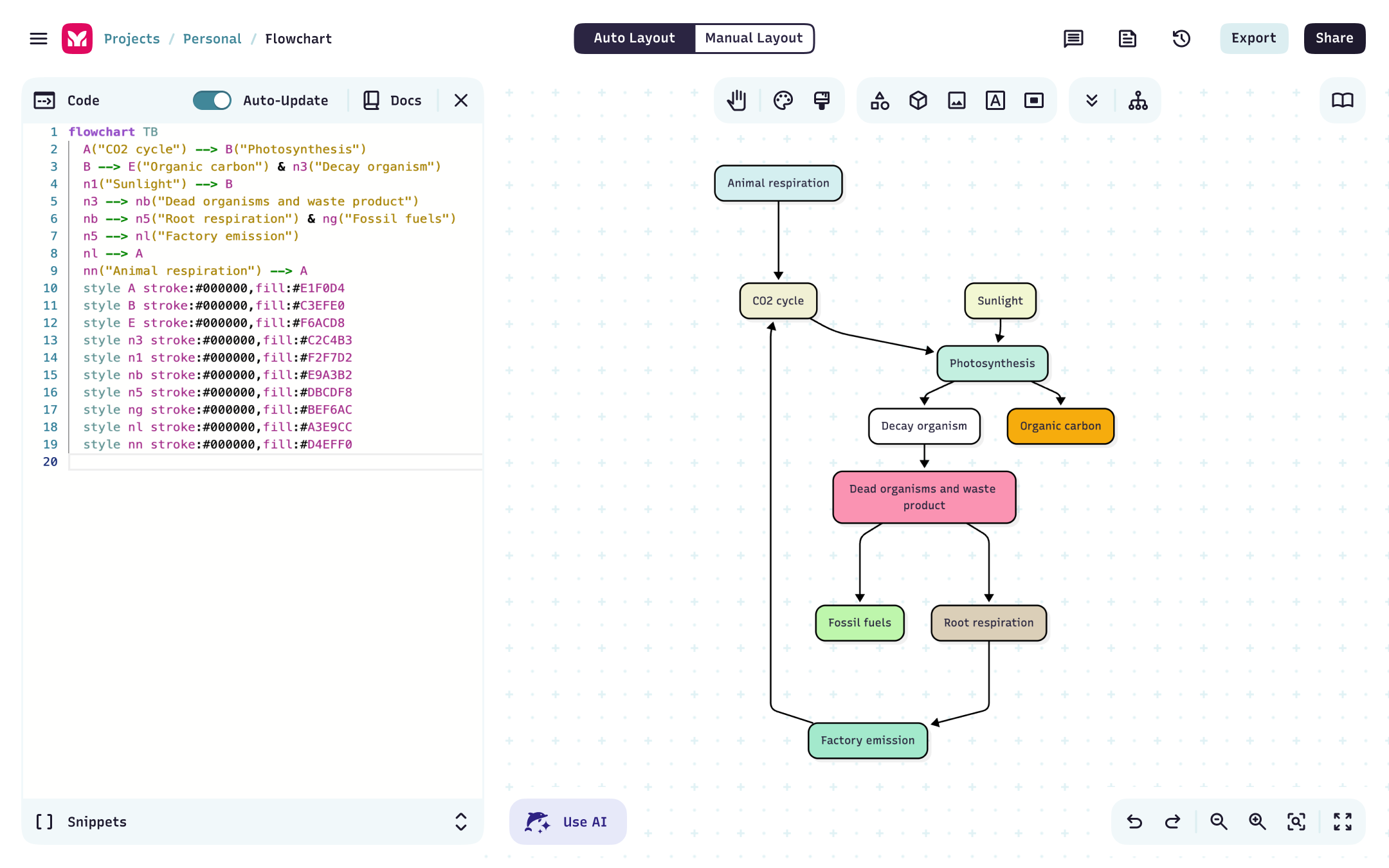
Text based diagramming
Easily create diagrams with text using Mermaid syntax.
Plugins
Extend the functionality of Mermaid with plugins and extensions. Easily reference and visualize diagrams within code, eliminate the need to store diagrams externally, and enhance efficiency and productivity with our Visual Studio Code plugin.
ChatGPT
Visual Studio Code
JetBrains IDE
Microsoft PowerPoint
Microsoft Word
Confluence
Google Docs
Jira
Share & Collaborate
Easily set permissions and share your diagrams. Set your diagram permissions to edit mode and allow others to collaborate with you. Sharing options:
Editor link
SVG link
Text based diagramming
Easily create diagrams with text using Mermaid syntax.
Plugins
Extend the functionality of Mermaid with plugins and extensions. Easily reference and visualize diagrams within code, eliminate the need to store diagrams externally, and enhance efficiency and productivity with our Visual Studio Code plugin.
ChatGPT
Visual Studio Code
JetBrains IDE
Microsoft PowerPoint
Microsoft Word
Confluence
Google Docs
Jira
Share & Collaborate
Easily set permissions and share your diagrams. Set your diagram permissions to edit mode and allow others to collaborate with you. Sharing options:
Editor link
SVG link
Diagrams that speak your language
For teams, visual thinkers, and collaborators of all backgrounds who need to create, edit, and share diagrams. Mermaid makes it easy to keep everyone on the same page.
Visual based diagramming
Easily create and edit diagrams with our AI Chat and Visual Editor.
AI Chat
Use our embedded AI Chat to generate diagrams from natural language descriptions. Simply type in your description and let our AI do the rest. The power and convenience of AI, all without leaving the Mermaid Editor.
Create a diagram
Edit a diagram
Repair a diagram
Diagram Repair
Have a syntax error? Simply click on the Repair Diagram button and our AI will automatically fix it for you.
Export Diagram
Export your diagram to a variety of formats:
PNG
SVG
MMD
Visual based diagramming
Easily create and edit diagrams with our AI Chat and Visual Editor.
AI Chat
Use our embedded AI Chat to generate diagrams from natural language descriptions. Simply type in your description and let our AI do the rest. The power and convenience of AI, all without leaving the Mermaid Editor.
Create a diagram
Edit a diagram
Repair a diagram
Diagram Repair
Have a syntax error? Simply click on the Repair Diagram button and our AI will automatically fix it for you.
Export Diagram
Export your diagram to a variety of formats:
PNG
SVG
MMD
“Making multiple flowcharts look good felt tedious. Mermaid flipped that – now I focus on my notes, and Mermaid takes care of the diagramming.”
“Mermaid solved a major portability problem for us, making charts behave like code. The real game-changer is using AI to analyze our software so we can visualize complex logic instantly.”
“From load balancers to Kubernetes, Mermaid helps me document architecture with my team: Markdown-native, version-controlled, and easy to share.”
“Mermaid is my mind tool — I map client’s systems 5-10 times faster, catch misreads quickly, and iterate in real time.”
“Mermaid transformed three things: clarity, collaboration, and speed. Onboarding becomes simpler and what used to take 30+ minutes in GUI tools takes under five.”
“Mermaid is the bridge between thinking and communication: I structure logic in text with AI, then turn it into clear visual maps, operating models, and strategy flows.”

Afrid Shirsekar
Data Scientist, AmazonLess time syncing, more time building
One shared canvas for mapping ideas, collaborating live, and keeping teams on the same page, literally.
FAQ
Have questions about building diagrams with code? These should help.